

Tutorials
12V Solenoid Lock: Fail-Secure Wiring with Arduino, Relay or MOSFET
Oct
A 12V cabinet solenoid lock like ours is fail-secure: with no power, a spring holds its bolt out and the door stays locked. Feeding 12V through the coil for a few seconds is what pulls the bolt in. It needs its own 12V supply, switched by a relay module or a MOSFET, never an Arduino pin, plus a flyback diode across the coil.
Shops also sell it as an electric latch lock, a cabinet lock or a solenoid latch; in Malay it is a kunci solenoid. An AS608 fingerprint sensor, an RFID card or a keypad code can decide who gets in, but this lock is the part that actually moves, so this page covers only the lock half: how it fails, how to power and switch it, and how to mount it so it releases every time.
What does fail-secure actually mean on a 12V solenoid lock?
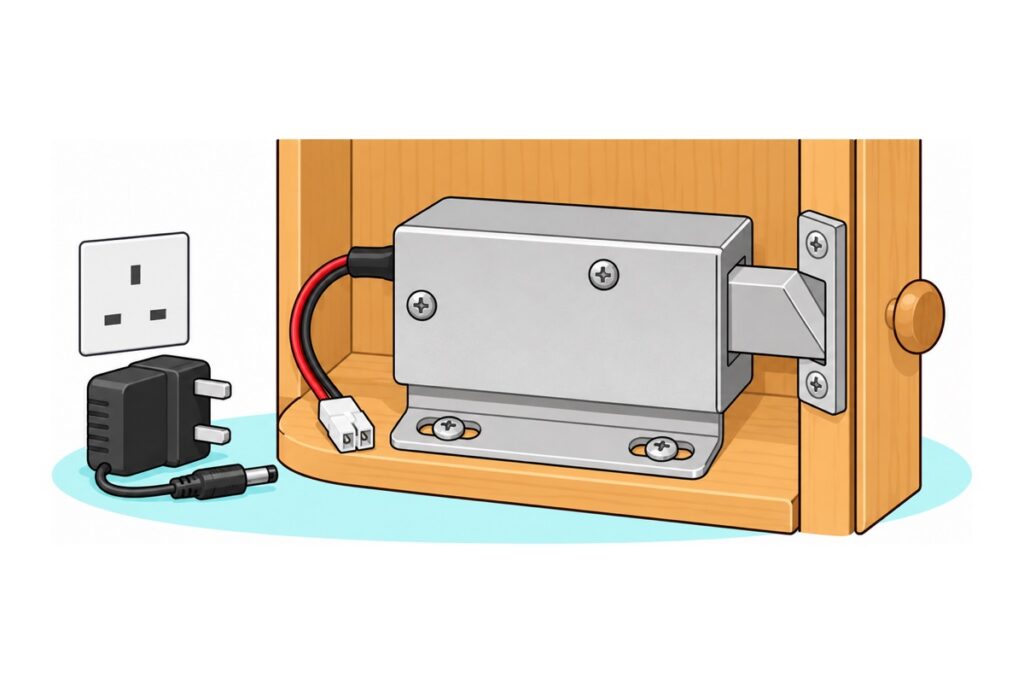
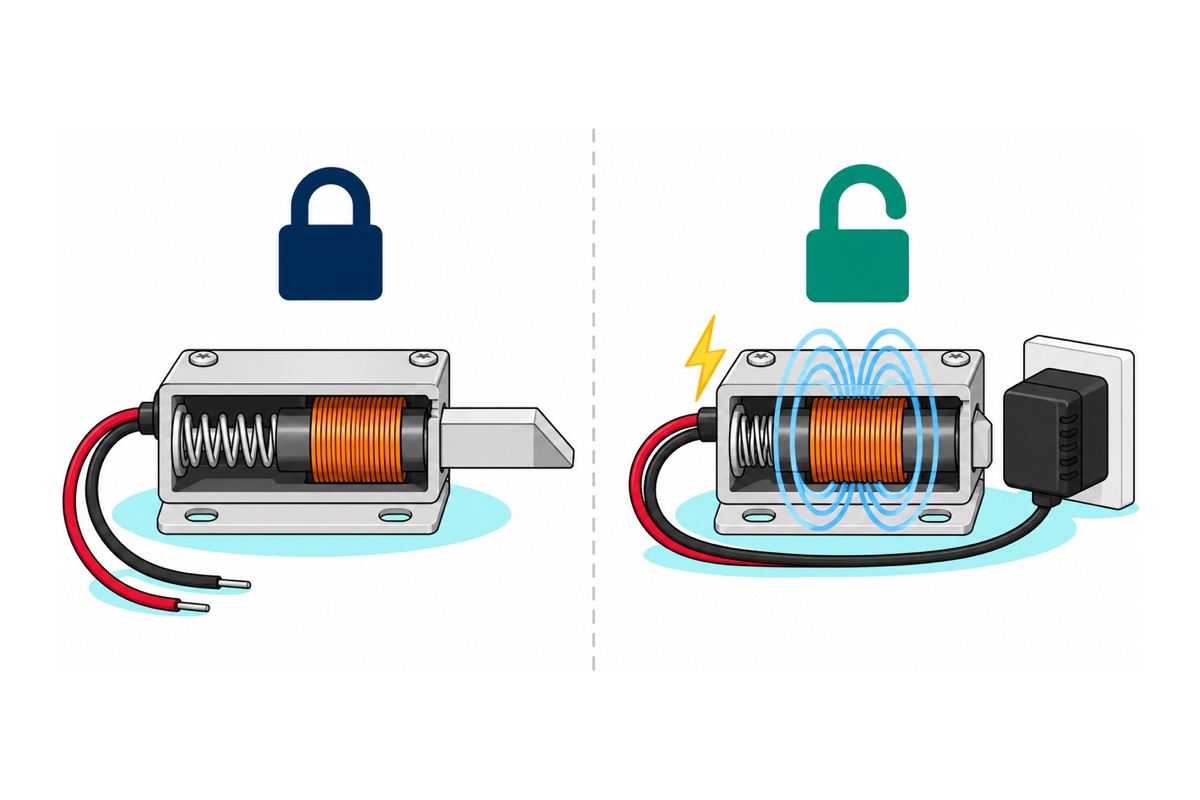
The 12V solenoid lock is a spring and an electromagnet fighting over one steel bolt. With nothing connected, a spring inside the case pushes the bolt out: the locked state, which is how the unplugged unit in our product photo sits. Current through the copper coil builds a magnetic field, and loose steel is always pulled toward where a field is strongest, so the plunger is dragged into the centre of the coil, compressing the spring and pulling the bolt in. Cut the current and the field collapses, so the spring wins again.
So a blackout locks the cabinet rather than opening it, the opposite of what many people assume. “Solenoid” only names the coil; which way the spring pushes decides the behaviour, and a fail-safe solenoid lock is simply sprung the other way, so power has to hold its bolt out. The two names say what is protected when the power fails: fail-secure keeps the contents secure, fail-safe keeps people safe because the door can open. The 45-degree bevel lets you close the door without power: the strike’s edge rides up the slope, pushes the bolt in against its spring, and the spring snaps it out into the strike.
Which parts do you need for a 12V solenoid lock build?
Parts list: 12V solenoid lock switched by a relay from an Uno
 12V SOLENOID LOCK ELECTRIC LATCH FAIL-SECURE FOR CABINET DOOR DIY ROBOTICS JST CONNECTOR
 Arduino Uno Compatible SMD UNO R3 with Type B Cable - ATMEGA328P with CH340G-Microcontroller Project
 Relay Module 3.3V 5V 12V 1/2/4/8 Ways Optocoupler Trigger Relay Module 1 2 4 8 Channel Relay Module - 5V RELAY MODULE(1WAY)
 Power Supply Adapter DC Universal AC to DC Converter PSU 5V2A 5V3A 9V2A 12V2A - P.S. ADAPTOR (12V2A)
 5.5x2.1mm DC Power Male Connector Plug Jack Adapter for Arduino DIY Electronics Projects - 5.5x2.1 DC CONNECTOR (F)
 40pcs Dupont Wire 10cm 20cm 30cm for Breadboard DIY Experiment Jumper Wire Breadboard wire - DUPONT WIRE M-M 20CM
Parts list
 IRF520 MOSFET Driver Module PWM Output Power Control for Arduino Raspberry Pi DC Motor Control
 40pcs Dupont Wire 10cm 20cm 30cm for Breadboard DIY Experiment Jumper Wire Breadboard wire - DUPONT WIRE M-F 30CM
 XL830L Digital Multimeter with backlight Portable Multimeter Electronics Project
The silent MOSFET lane instead of the relay (its header pins are male, so it takes male-to-female jumpers), plus a multimeter to check the adapter's polarity and measure the lock's coil. The MOSFET lane also needs a 1N4007-class rectifier diode across the lock, sourced separately.
The 12V solenoid lock ships pre-wired with a red/black lead ending in a small white 2-pin plug. Screw terminals want bare wire, so cut the plug off and strip about 5 mm of each wire. The 5V 1-way relay module has screw terminals on both sides, control side included, so the Uno links are male-to-male jumpers: one end in the Uno’s header, the bare pin clamped in the terminal.
The 12V 2A adapter ends in a 5.5×2.1 mm barrel plug, and the female DC jack pigtail turns that into red and black wires. If it shows out of stock, any 5.5×2.1 mm female jack with leads or screw terminals does the same job, or use a bench supply set to 12V.
Two things sit outside the parts list. One is a 1N4007-class rectifier diode (any 1N4001 to 1N4007 will do) to fit across the lock’s coil: mandatory with the MOSFET, and worth fitting with the relay too, as the flyback section explains. The other is a strike for the bolt to drop into, because the lock comes on its own; the mounting section covers that.
Why won’t a solenoid lock run from the Arduino 5V pin or a powerbank?
A solenoid lock is a coil of copper wire, so Ohm’s law sets its current: I = V ÷ R. Our lock is the standard cabinet-latch size, with a coil of roughly 15–20 Ω, so at 12V it draws about 12 ÷ 20 = 0.6 A up to 12 ÷ 15 = 0.8 A; the same latch design is rated 650 mA at 12V. You can confirm yours in ten seconds: set the multimeter to ohms, read across the lock’s two wires, and divide 12 by the reading.
| Source | What it can give | What the lock needs |
|---|---|---|
| Uno output pin | About 20 mA at 5V | 0.6–0.8 A at 12V: 30–40× more current |
| Uno 5V pin on USB | Shares the port’s 500 mA × 5V = 2.5 W with the board | 7–10 W |
| Powerbank, straight | 5V | 12V; at 5V only about 17% of the pull |
| 12V 2A adapter | Up to 2 A at 12V | Covers the worst case with 2.5× headroom |
Power is volts times amps: 12V × 0.6–0.8 A is about 7–10 W. Through the Uno’s 5V pin on a laptop, the board and everything on that pin share one standard USB 2.0 port’s 500 mA, 2.5 W, so even a perfect 5V-to-12V boost converter there cannot cover the lock. A powerbank has the watts (a 2.1 A port gives about 10 W) but only at 5V, and running the 12V coil on 5V fails differently: the current drops to 5/12 of normal, and a solenoid’s pull scales roughly with current squared, so (5/12)² ≈ 0.17, about a sixth. That is too weak to drag the bolt back against its spring. A powerbank can only work through a 12V USB-PD trigger or a boost module, and many powerbanks switch themselves off between pulses because the idle load is too small to keep them awake.
How do you wire a solenoid lock to an Arduino through a relay?
The 5V relay module lets the Uno flip a switch it never touches electrically: the Uno drives the module’s control terminals, and the relay’s contacts close the 12V loop to the lock.
| From | To | Note |
|---|---|---|
Uno 5V |
Relay DC+ |
Powers the relay’s own coil and opto |
Uno GND |
Relay DC- |
|
Uno D7 |
Relay IN |
Trigger jumper on H: HIGH = unlocked |
| Jack red (+12V) | Relay COM |
Check polarity with the meter first |
Relay NO |
Lock red | Open at rest, so the lock is unpowered |
| Lock black | Jack black (−) | Diode across the lock: band to red |
| Uno USB-B | Laptop or 5V USB charger | Never the 12V adapter |
Before connecting the lock, check the jack’s red wire reads about +12V on the meter. The lock itself doesn’t care which way current flows through it, because the steel plunger is attracted by either field direction, but the diode across it does.
The lock’s black wire and the jack’s black wire meet with no relay terminal between them, so join them in a small screw-terminal block or a lever connector, not a bare twist that can work loose inside the cabinet. The diode then bridges the lock: its banded leg clamps into the relay’s NO terminal alongside the lock’s red wire, and its plain leg goes into that black joint.
The relay’s contacts are a metal switch moved by the relay’s own coil, with no electrical connection between them and the control side. The 12V loop and the Uno never share a wire on the relay route. Set the trigger jumper to H so HIGH means unlocked, matching the sketch; while the Uno resets, its pins float and push no current into the opto, so the relay stays off and the lock stays locked.
How do you switch a solenoid lock with an IRF520 MOSFET instead?
The IRF520 MOSFET module switches the lock silently, with no click. It connects the lock’s negative wire to ground when its gate is driven HIGH.
| Module terminal | Connects to | Note |
|---|---|---|
SIG |
Uno D7 |
HIGH = unlocked |
VCC |
Uno 5V |
Not connected on this board (the LED runs off SIG), so optional |
GND (header) |
Uno GND |
Mandatory shared ground |
VIN / GND |
Jack red / black | 12V supply |
V+ / V- |
Lock red / black | 1N4007-class diode across them, band to V+ |
With the MOSFET, the shared ground is mandatory. A MOSFET turns on according to the voltage between its gate and its source, and on this module the source is the 12V supply’s negative. The Uno’s 5V HIGH is 5V above the Uno’s GND; unless that GND is wired to the module’s GND, the gate-source voltage is undefined and the switching is erratic.
The IRF520 is a standard-gate part that only fully turns on at 10V. At an Uno’s 5V gate it is partly on, which is fine for this load: even half an ohm of on-resistance at the worst-case 0.8 A wastes only 0.8² × 0.5 ≈ 0.3 W, for a two-second pulse. From a 3.3V board it barely conducts; our IRF520 guide explains that gate trap.
Why is the flyback diode across the solenoid not optional?
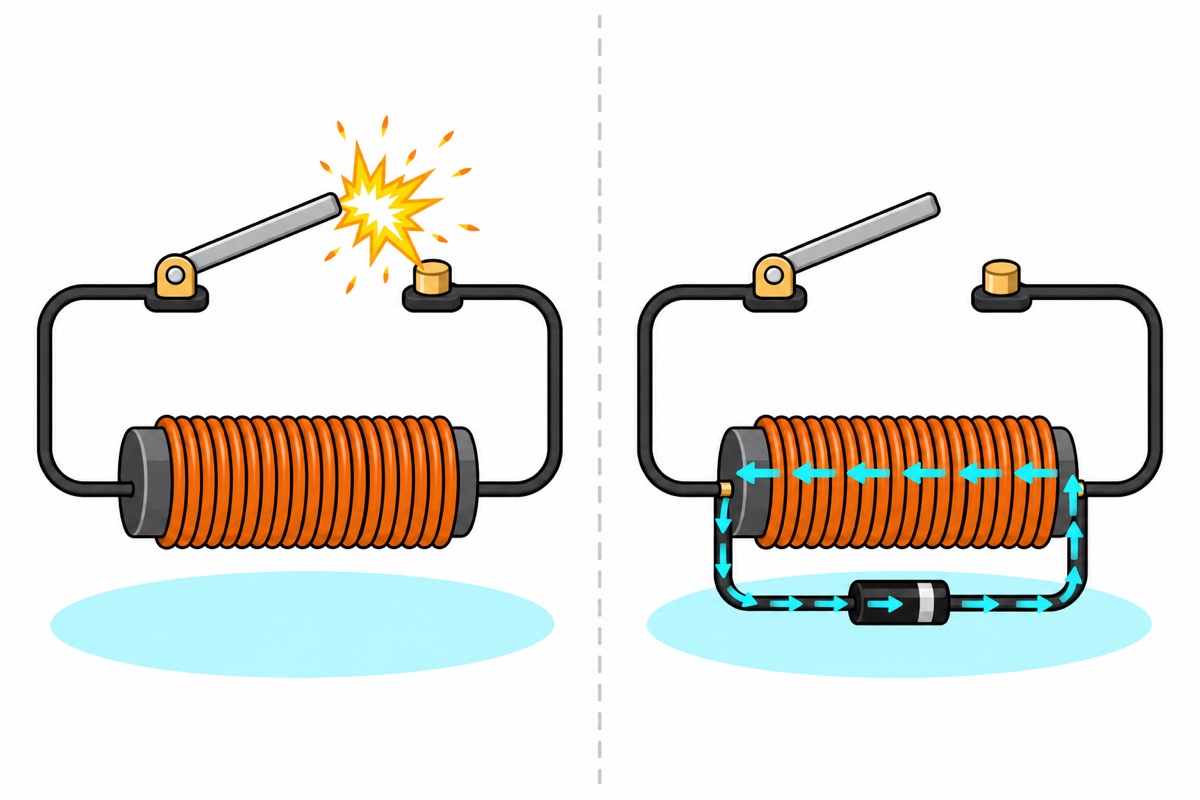
The solenoid lock’s coil stores energy in its magnetic field while current flows, and an inductor resists any change in its current. Its voltage is V = L × (rate of change of current). When a relay contact or MOSFET opens in microseconds, the current is told to fall to zero almost instantly, so the coil generates whatever voltage it takes to keep it flowing, easily hundreds of volts. That spike arcs across opening relay contacts, burning a little metal off each time, or exceeds the IRF520’s 100V drain rating, so the transistor breaks down and soaks up the spike’s energy as heat inside itself. Repeated hits can kill it, and a dead MOSFET usually fails shorted: the lock then stays powered, unlocked and overheating.
A diode across the coil gives that current a loop. At switch-off it keeps circulating through the coil and diode, decaying in the coil’s own resistance within milliseconds, so the switch never sees much more than 12V plus the diode’s drop of about 1V. A 1N4007 is rated 1 A and 1000V, and the loop current can never exceed the coil current already flowing, at most 0.8 A here.
Fit it with the band (cathode) to the lock’s red, positive wire. Reversed, it conducts the moment the switch closes: a dead short across the 12V supply. The diode on the relay module protects the transistor that drives the relay’s own coil; the lock’s coil is a separate inductor on the far side of the contacts. The IRF520 module carries no diode at all, only the MOSFET, an LED and two resistors, so there it is mandatory; with the relay it saves the contacts, as our relay safety guide covers.
What does the solenoid lock sketch look like?
The solenoid lock sketch below energises the coil through D7 for two seconds on command, then enforces a rest before the next pulse, so a repeated command can never keep the coil powered.
// 12V solenoid lock: momentary unlock from the Serial Monitor
// Works with either switch: relay module (jumper on H) or IRF520 module SIG
// D7 HIGH = coil powered = bolt pulled in (unlocked)

const int LOCK_PIN = 7;
const unsigned long UNLOCK_MS   = 2000;   // how long the bolt stays pulled in
const unsigned long COOLDOWN_MS = 10000;  // rest before the next pulse: the coil heats while powered

bool unlocked = false;
unsigned long unlockedAt = 0;
unsigned long lockedAt = 0;
bool firstPulse = true;

void setup() {
  digitalWrite(LOCK_PIN, LOW);   // set the level before the pin becomes an output
  pinMode(LOCK_PIN, OUTPUT);     // starts LOW: coil off, bolt out, cabinet locked
  Serial.begin(9600);
  Serial.println(F("Type u and press Enter to unlock"));
}

void unlockPulse() {
  if (unlocked) return;
  if (!firstPulse && millis() - lockedAt < COOLDOWN_MS) {
    Serial.println(F("Coil cooling down, try again shortly"));
    return;
  }
  digitalWrite(LOCK_PIN, HIGH);  // energise the coil: bolt retracts
  unlocked = true;
  firstPulse = false;
  unlockedAt = millis();
  Serial.println(F("Unlocked"));
}

void loop() {
  if (Serial.available()) {
    char c = Serial.read();
    if (c == 'u' || c == 'U') unlockPulse();
  }

  // drop the power after UNLOCK_MS: the spring pushes the bolt back out
  if (unlocked && millis() - unlockedAt >= UNLOCK_MS) {
    digitalWrite(LOCK_PIN, LOW);
    unlocked = false;
    lockedAt = millis();
    Serial.println(F("Locked"));
  }
}
Open the Serial Monitor at 9600 baud and send u. The pulse is short because a powered coil turns all of its 7–10 W into heat in a small steel case; as the copper warms its resistance rises, pull falls and the insulation ages. Two seconds on, ten off, averages under a fifth of that heat. Because the timing uses millis(), the loop stays free: swap the Serial check for a fingerprint match from the AS608 door lock, a card from the RFID RC522 build, or a code from the 4×4 keypad lock.
The lock only releases the door; nothing pushes it open. Fit a knob and pull while the bolt is pulled in, or lengthen UNLOCK_MS by a second or two. A spring that pushes the door open sounds handy, but it presses the bolt sideways against the strike, which the next section shows is exactly what jams it.
How do you mount a solenoid lock so the bolt doesn’t jam?
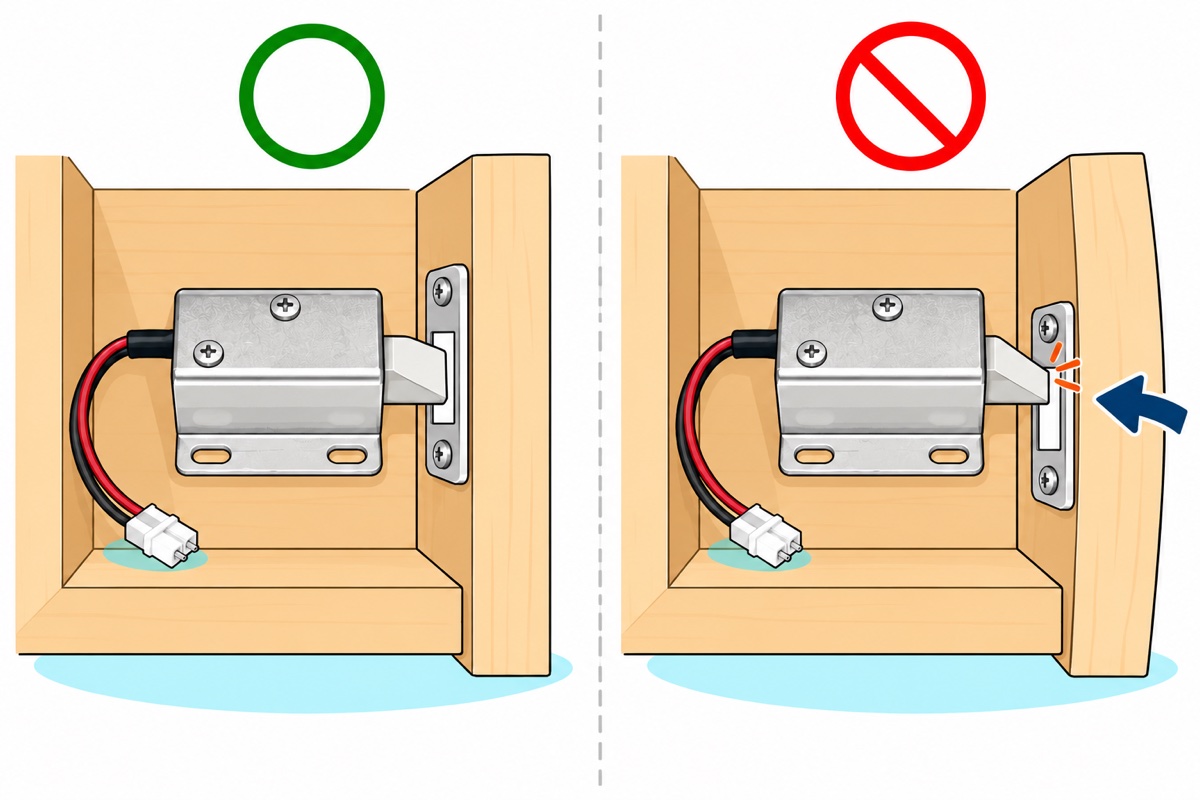
The solenoid lock’s pull is modest, and friction can beat it. To retract, the coil must overcome the spring plus any friction on the bolt, and friction is the coefficient of friction times whatever presses the bolt sideways. With the door hanging free, that side load is near zero. A warped panel, a rubber seal pushing outward, or someone leaning on the door clamps the bolt against the strike, and the coil sits powered without moving it, only getting hotter.
So mount the lock inside the cabinet, where its wires never flex, bolt pointing at the door, with the bevel facing the way the door closes, so the strike rides up the slope. The lock comes on its own, so the strike is yours to fit: a small steel L-bracket from a hardware store, screwed to the door, is the usual choice (a slot in a 3D-printed enclosure works too), and its edge must be smooth for the bevel to ride. Leave a millimetre or two of clearance around the bolt in the strike. The foot’s two obround slots let you slide the lock along its axis: close the door, check the bolt drops fully into the strike, then tighten. A thin door that bows when pulled loads the bolt; stiffen it, or mount the lock near a corner where the door barely moves.
Fail-secure or fail-safe: which lock does your project need?
A fail-secure 12V solenoid lock is the right part for a cabinet, a drawer, a parcel box or an FYP demo box, where a power cut should leave the contents shut. It is the wrong part for anything a person walks through or might need to get out of. That needs fail-safe hardware, which opens when power is lost. A magnetic lock holds only while its electromagnet is powered, and a fail-safe electric strike needs current to keep its keeper shut, so a blackout releases both.
If a fail-secure cabinet must still open during an outage, plan it in: a backup battery on the 12V supply, or a mechanical override only you can reach. This is a deterrent-grade latch for projects, not a security product. Its weak point is wiring: anything reaching the coil from outside can energise it, so keep the supply, the relay or MOSFET and every wire on the locked side.
Common mistakes we see
Powering the lock from the Uno. On the 5V rail the 12V coil gets 5/12 of its current and about a sixth of its pull, so the bolt barely moves; straight off a pin it would overload the pin many times over. Give the lock its own 12V supply.
Holding the lock open. A coil left powered cooks. Unlock in pulses and let the spring lock.
Wiring the lock to NC instead of NO. NC is closed whenever the relay is off, so the coil is powered whenever the Uno is idle or unplugged: the cabinet sits unlocked and the coil cooks. The lock belongs on NO.
Fitting the diode backwards. It shorts the supply at the first switch-on. Band to positive.
Only testing on the bench. A lock that clicks on the desk can jam once mounted. Test it in the cabinet, door closed.
FAQ
Is a solenoid lock locked or unlocked without power?
Locked. A spring holds the bolt out until 12V pulls it in, so a power cut leaves the cabinet shut.
Can I use a 5V solenoid lock with Arduino instead?
Yes, but it is not easier. A 5V lock doing the same work needs similar watts, so at 5V it draws more current, typically 0.8–1.5 A: far beyond a 20 mA pin and more than the Uno’s whole USB budget. It still needs a relay or MOSFET and its own supply. This 12V lock run at 5V gets only about a sixth of its pull.
How long can I keep a 12V solenoid lock energised?
Seconds, not minutes. A powered coil turns all its power into heat, so unlock in short pulses with rest in between.
Can I power the Arduino from the same 12V adapter?
Not through this Uno’s barrel jack, which is specified up to 9V: its regulator burns every volt above 5 as heat. Run the Uno on USB, or step the 12V down to 5V with a buck converter.
What if the door must open when the power fails?
Use a fail-safe lock, such as a magnetic lock or fail-safe strike. Anything a person passes through should never depend on power to open.
Last updated October 2026. Stuck? Chat with us on WhatsApp.
