

Tutorials
Which ESP32-CAM Board to Buy: Classic OV2640 or ESP32-S3 OV5640?
Oct
For a first camera project, buy the ESP32-S3 WROOM CAM with the OV5640 camera: it uploads over one USB-C cable, and its bigger, faster memory and newer cores handle higher frame rates and on-board image processing. The classic AI-Thinker ESP32-CAM with an OV2640 suits a lower-cost build, provided it comes with a programmer shield or you own a USB-to-serial adapter.
This guide stops at the order: once the board arrives, the ESP32-CAM first-stream guide takes it from the box to live video. If your project needs no camera at all, see which ESP32 variant to buy.
How do the classic ESP32-CAM and the ESP32-S3 WROOM CAM compare?
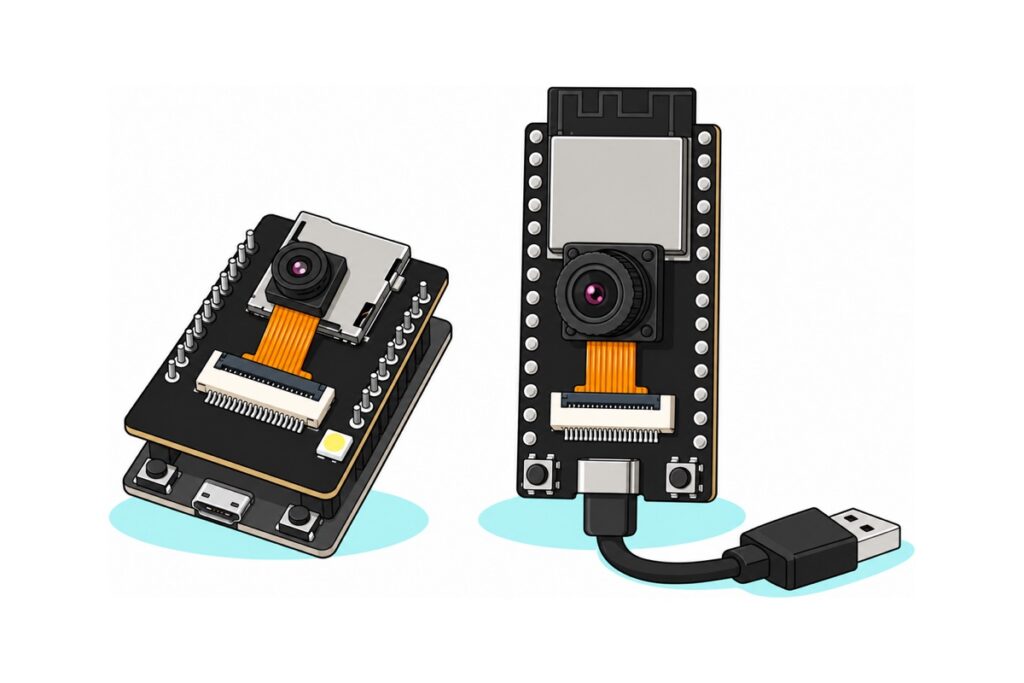
The classic ESP32-CAM and the ESP32-S3 WROOM CAM run the same camera driver and streaming example. They differ in how you program them, the memory behind the camera, and the sensor in the box.
| Classic AI-Thinker ESP32-CAM | ESP32-S3 WROOM CAM | |
|---|---|---|
| Chip | ESP32, dual-core Xtensa LX6, 240 MHz | ESP32-S3, dual-core Xtensa LX7, 240 MHz, with 128-bit SIMD instructions |
| Internal SRAM | 520 KB | 512 KB |
| PSRAM | 4 MB usable, four-line (quad) bus | 8 MB, eight-line (octal) bus |
| Flash | 4 MB | 16 MB |
| Camera in the box | OV2640, 2 MP, already fitted | OV5640, 5 MP, packed loose |
| Largest frame | 1600 × 1200 | 2592 × 1944 sensor; 2560 × 1920 through the esp32-camera driver |
| Hardware JPEG in the sensor | Yes | Yes |
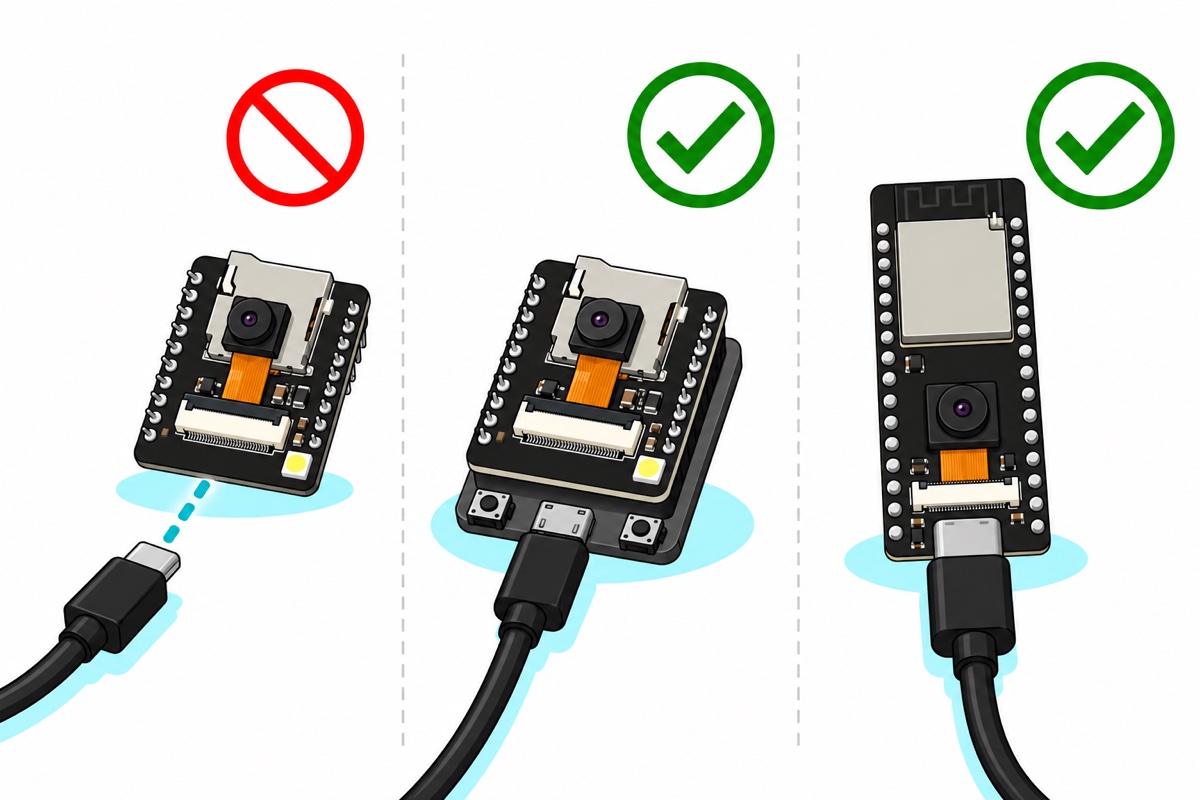
| USB on the camera board | None; the micro-USB is on the ESP32-CAM-MB programmer shield, which ours ships with | Two USB-C (native USB + UART bridge) |
| Power in | 5 V via the shield’s micro-USB or the 5V pin | 5 V via USB-C or the 5V pin |
| Header | 16 pins; few GPIO stay free once the camera and microSD slot are in use | Two long rows, header strip supplied for soldering |
What comes in each ESP32-CAM box, and which cable does it need?
Pick ONE camera board: these are alternatives, not a kit
| Item | Price | Qty | |
|---|---|---|---|
 ESP32-S3 WROOM CAM DEVELOPMENT BOARD OV5640 CAMERA MODULE WIFI BLUETOOTH DUAL USB-C IOT AIS3CAM56 ESP32-S3 WROOM CAM DEVELOPMENT BOARD OV5640 CAMERA MODULE WIFI BLUETOOTH DUAL USB-C IOT AIS3CAM56 | RM56.95 | ||
 NodeMCU ESP32 CAM Wi-Fi Bluetooth Camera Board OV2640 / RHYX-M21-45 with CH340/CP2012 - OV2640 ESP32-CAMES32CAM NodeMCU ESP32 CAM Wi-Fi Bluetooth Camera Board OV2640 / RHYX-M21-45 with CH340/CP2012 - OV2640 ESP32-CAMES32CAM | RM44.95 | Out of stock |
Parts list
 CH340G USB to TTL UART Serial Converter Download Cable for Arduino Programming ESP8266 NodeMCU Development Board
 Data Cable Type-A Type-C MicroUSB Type-B 0.5m 1m 30cm 0.3m 100cm Data Transfer Upload Code - TYPE-A TO TYPE-C CABLE (0.5M)
 Data Cable Type-A Type-C MicroUSB Type-B 0.5m 1m 30cm 0.3m 100cm Data Transfer Upload Code - MicroUSB CABLE (0.5M)
Only what your route needs. The CH340 cable is for a bare AI-Thinker board you already own without a shield: it flashes over five connections, with GPIO0 held to GND during the upload (the MB shield does that with its IO0 button). Take the USB-C data cable for the S3 board or the micro-USB data cable for the MB shield; 1.0 m lengths are on the same pages. It must be a data cable: a charge-only lead powers the board but never produces a COM port.
The ESP32-S3 WROOM CAM is a long black board whose module is marked N16R8: 16 MB of flash, 8 MB of PSRAM. It comes as a kit, with the OV5640 on an orange ribbon and a header strip you only need to solder for a breadboard or extra wiring; the camera and USB-C work without it. The classic ESP32-CAM with OV2640 arrives as a two-board stack: the black camera board sits on an ESP32-CAM-MB programmer shield, which carries the micro-USB socket and the IO0 and RST buttons.
Why does a first ESP32-CAM order so often stall at the upload?
The classic AI-Thinker ESP32-CAM board has no USB socket and no USB-to-serial chip. The ESP32 takes new firmware over UART0, a 3.3 V serial line on the pins marked U0T and U0R, which no laptop can plug into, so something must convert USB to serial. The chip must also be told to accept firmware: at reset it reads GPIO0, low meaning wait for new firmware, high meaning run what is in flash. A bare board holds GPIO0 high, so it only ever boots its old program.
A bare board bought elsewhere therefore can’t be programmed until you add a USB-to-serial adapter such as our CH340 download cable, wired like this:
| Adapter lead | ESP32-CAM pin | Note |
|---|---|---|
| 5 V (red) | 5V |
Never the 3.3V pin: 5 V there skips the regulator and reaches the 3.3 V chip directly |
| GND (black) | GND |
|
| TX (green) | U0R (GPIO3) |
The adapter’s transmit goes to the board’s receive |
| RX (white) | U0T (GPIO1) |
If the upload never connects, swap TX and RX; it does no harm |
| Female-to-female jumper wire | GPIO0 to a spare GND pin |
Fit it, then press RST (on the board’s underside) so the chip reads GPIO0 low, then upload; remove it and press RST again to run |
Left fitted, the jumper sends every reset back into download mode, and GPIO0 is also the camera’s clock line. The ESP32 is a 3.3 V chip, so first measure the cable’s TX lead against black with the cable plugged into the laptop but not yet wired to the board: a UART line rests high, so that reading is its logic level. Near 5 V, divide it down: a 1 kΩ resistor in series from TX to U0R and a 2 kΩ resistor from U0R to GND leave two-thirds of 5 V, about 3.3 V.
Our OV2640 ESP32-CAM ships seated on the ESP32-CAM-MB programmer shield, which supplies exactly what the bare board lacks: a CH340 USB-to-serial chip behind the micro-USB socket, and IO0 and RST buttons for download mode. One micro-USB data cable and it uploads much like a DevKit. If an upload stalls at “Connecting…”, hold IO0, tap RST, release IO0 and upload again; if the sketch doesn’t start afterwards, tap RST. The ESP32-S3 needs no adapter, shield or jumper: its built-in USB Serial/JTAG controller talks to the laptop directly and puts the chip into download mode by itself. If no port appears, suspect the cable first; after that, the CH340 driver on the MB shield, or the other USB-C port on the S3 (ESP32 not detected).
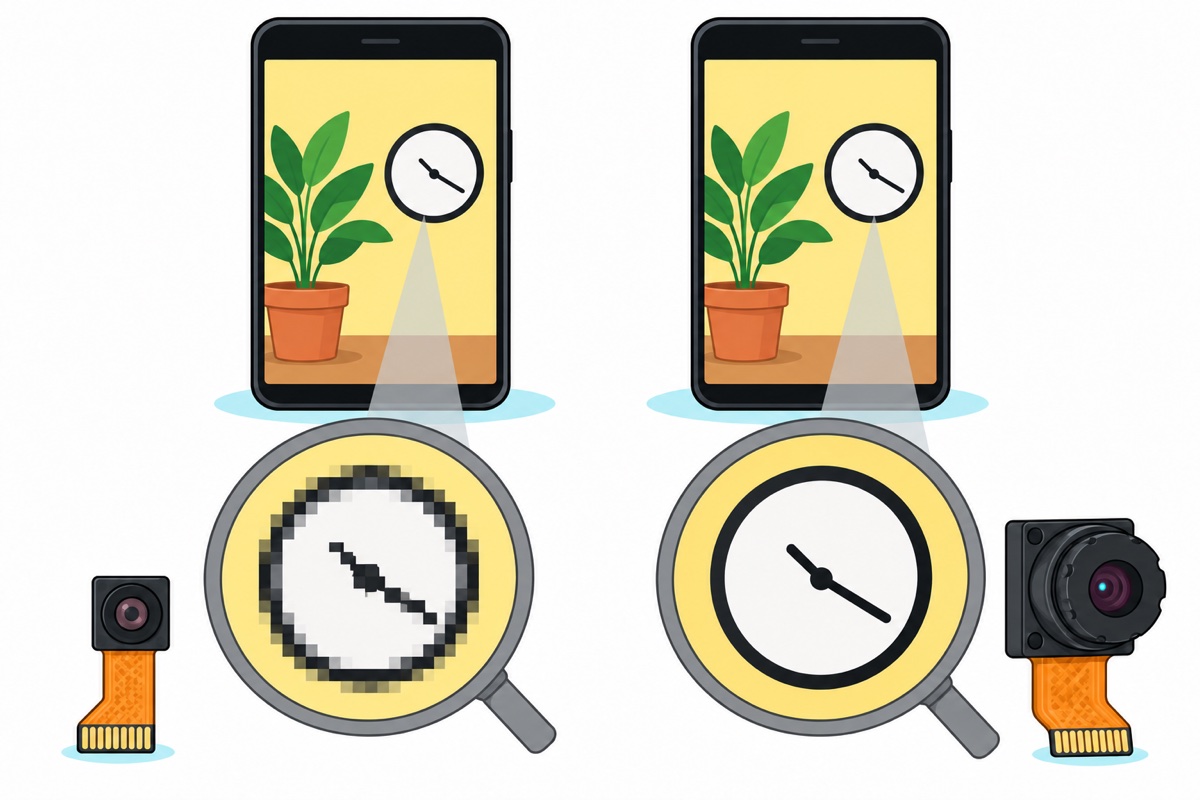
Does the OV5640’s 5 MP actually look sharper on a phone?
The OV5640’s extra pixels only show when you zoom in or print. The OV2640’s largest frame is 1600 × 1200, 1.92 million pixels; the OV5640’s is 2592 × 1944, 5.04 million. A typical phone screen is about 1080 pixels across, so at full width the 1600-pixel frame is already shrunk by a third and the 2592-pixel one by three-fifths: they look the same. Zoom in two times and the screen shows half the frame’s width. From the OV2640 that is 800 pixels stretched across 1080, which looks soft; from the OV5640 it is 1296, still more than the screen needs. That is what 5 MP buys: reading a meter dial or a number plate from a still.
Live video rarely runs at either maximum: a JPEG grows roughly with its pixel count, so 2592 × 1944 carries about sixteen times the data of 640 × 480, and Wi-Fi must send every frame. Smooth streams run at VGA or SVGA on either board.
What do the ESP32-S3’s extra PSRAM and LX7 cores buy you?
The ESP32-S3 WROOM CAM’s real advantage is the computer behind the camera. Processing an image needs raw pixels, such as RGB565 at 2 bytes each, and one 640 × 480 frame is then 640 × 480 × 2 = 614,400 bytes: more than the 512–520 KB of SRAM in either chip, which also holds Wi-Fi and your program. So the esp32-camera driver puts frames in PSRAM, an extra RAM chip inside the module, for anything beyond small JPEG frames.
One raw 1600 × 1200 frame is 3.84 MB, almost all of the classic board’s 4 MB, leaving no room for a second copy or a detection model’s working memory; on the S3’s 8 MB the same frame leaves more than half free. Speed comes from the bus and the cores. Every frame in PSRAM is written once by the camera and read back at least once to be sent or processed, so PSRAM’s speed caps how many frames per second the chip can move and work on, and raw frames weigh far more than JPEG ones: a VGA JPEG is tens of kilobytes, the same frame in RGB565 is 614,400 bytes. The S3’s PSRAM uses eight data lines instead of four, so each clock moves twice the bits. Both chips run at 240 MHz, but the S3’s SIMD instructions process 16 bytes in a single instruction, where the classic ESP32’s LX6 cores work through them one at a time, and colour tracking and face detection repeat that arithmetic for every pixel of every frame. That is why Espressif’s ESP-DL vision library targets the S3 and falls back to much slower plain C on the classic ESP32.
OV2640 or RHYX-M21-45: which ESP32-CAM camera variant?
Our classic ESP32-CAM also comes as an RHYX-M21-45 variant, a camera built around a GalaxyCore GC2145 sensor with no JPEG encoder. CameraWebServer streams MJPEG, a rapid sequence of JPEG pictures. The OV2640 compresses each frame inside the sensor, so the ESP32 only forwards finished pictures; with the GC2145, the default sketch asks for JPEG and the camera fails to start until you switch it to RGB565 at small frame sizes.
Once switched, CameraWebServer does stream again, but only by compressing every frame in software on the ESP32, which costs frame rate. The RHYX variant’s real job is on-board processing that wants raw RGB565 anyway, such as colour tracking or line following; to stream to a phone, pick the OV2640.
How do you check which chip, PSRAM and camera arrived?
Seat the ESP32-S3 board’s OV5640 first (the ribbon steps are further down), then let this sketch ask the hardware: it prints the chip, the PSRAM size and the sensor’s ID, then captures one test frame. Pick AI Thinker ESP32-CAM under Tools → Board for the classic board, or ESP32S3 Dev Module with the PSRAM and USB settings from the first-stream guide.
// ESP32-CAM arrival check: which chip, how much PSRAM, which camera sensor
// Works on the classic AI-Thinker ESP32-CAM and the ESP32-S3 WROOM CAM
#include "esp_camera.h"

#if defined(CONFIG_IDF_TARGET_ESP32S3)
// ESP32-S3 WROOM CAM (same pin map as CAMERA_MODEL_ESP32S3_EYE)
#define PWDN_PIN  -1
#define RESET_PIN -1
#define XCLK_PIN  15
#define SIOD_PIN   4
#define SIOC_PIN   5
#define Y9_PIN    16
#define Y8_PIN    17
#define Y7_PIN    18
#define Y6_PIN    12
#define Y5_PIN    10
#define Y4_PIN     8
#define Y3_PIN     9
#define Y2_PIN    11
#define VSYNC_PIN  6
#define HREF_PIN   7
#define PCLK_PIN  13
#else
// Classic AI-Thinker ESP32-CAM (same pin map as CAMERA_MODEL_AI_THINKER)
#define PWDN_PIN  32
#define RESET_PIN -1
#define XCLK_PIN   0   // GPIO0 is also the boot-mode pin
#define SIOD_PIN  26
#define SIOC_PIN  27
#define Y9_PIN    35
#define Y8_PIN    34
#define Y7_PIN    39
#define Y6_PIN    36
#define Y5_PIN    21
#define Y4_PIN    19
#define Y3_PIN    18
#define Y2_PIN     5
#define VSYNC_PIN 25
#define HREF_PIN  23
#define PCLK_PIN  22
#endif

void setup() {
  Serial.begin(115200);
  delay(1500);

  Serial.printf("Chip: %s, %d cores\n", ESP.getChipModel(), ESP.getChipCores());
  Serial.printf("PSRAM: %lu bytes\n", (unsigned long)ESP.getPsramSize());

  camera_config_t config = {};
  config.pin_pwdn = PWDN_PIN;
  config.pin_reset = RESET_PIN;
  config.pin_xclk = XCLK_PIN;
  config.pin_sccb_sda = SIOD_PIN;
  config.pin_sccb_scl = SIOC_PIN;
  config.pin_d7 = Y9_PIN;
  config.pin_d6 = Y8_PIN;
  config.pin_d5 = Y7_PIN;
  config.pin_d4 = Y6_PIN;
  config.pin_d3 = Y5_PIN;
  config.pin_d2 = Y4_PIN;
  config.pin_d1 = Y3_PIN;
  config.pin_d0 = Y2_PIN;
  config.pin_vsync = VSYNC_PIN;
  config.pin_href = HREF_PIN;
  config.pin_pclk = PCLK_PIN;
  config.xclk_freq_hz = 20000000;
  config.ledc_timer = LEDC_TIMER_0;
  config.ledc_channel = LEDC_CHANNEL_0;
  // RGB565 at 320x240: every sensor here supports it, JPEG or not
  config.pixel_format = PIXFORMAT_RGB565;
  config.frame_size = FRAMESIZE_QVGA;
  config.fb_count = 1;
  config.grab_mode = CAMERA_GRAB_LATEST;
  config.fb_location = psramFound() ? CAMERA_FB_IN_PSRAM : CAMERA_FB_IN_DRAM;

  esp_err_t err = esp_camera_init(&config);
  if (err != ESP_OK) {
    Serial.printf("Camera init failed: 0x%x. Power off, re-seat the ribbon, check the 5 V supply.\n", (unsigned)err);
    return;
  }

  sensor_t *s = esp_camera_sensor_get();
  camera_sensor_info_t *info = esp_camera_sensor_get_info(&s->id);
  if (info) {
    Serial.printf("Sensor: %s (PID 0x%04x)\n", info->name, (unsigned)s->id.PID);
    Serial.printf("Largest frame: %u x %u, hardware JPEG: %s\n",
                  (unsigned)resolution[info->max_size].width,
                  (unsigned)resolution[info->max_size].height,
                  info->support_jpeg ? "yes" : "NO");
  } else {
    Serial.printf("Unknown sensor, PID 0x%04x\n", (unsigned)s->id.PID);
  }

  camera_fb_t *fb = esp_camera_fb_get();
  if (fb) {
    // 320 x 240 pixels x 2 bytes = 153600 bytes for RGB565
    Serial.printf("Test frame: %u x %u, %u bytes\n", (unsigned)fb->width, (unsigned)fb->height, (unsigned)fb->len);
    esp_camera_fb_return(fb);
  } else {
    Serial.println("No frame captured: re-seat the ribbon and try again.");
  }
}

void loop() {
}
The check prints once, at start-up, so open the Serial Monitor at 115200 baud and then press RST to run it again. The classic board reports about 4 MB of PSRAM and an OV2640 with JPEG “yes”; the S3 about 8 MB and an OV5640, whose largest frame prints as 2560 × 1920, the driver’s biggest preset just inside the sensor’s 2592 × 1944; a GC2145 prints JPEG “NO”. On the S3, “PSRAM: 0 bytes” means Tools → PSRAM is not set to OPI PSRAM, not that the chip is missing. The test frame should be 153,600 bytes: 320 × 240 × 2, the same RGB565 arithmetic as above. “Camera init failed” points at the ribbon first.
Can an OV7670 camera module replace the ESP32-CAM’s camera?
No. The OV7670 module that turns up in camera searches is a bare VGA sensor on a blue board with an 18-pin double row of male header pins. Both ESP32 camera boards take their camera through a 24-pin flat-ribbon (FPC) socket, so it can’t plug in, and jumpers don’t get round that: on the classic board the camera’s data and sync lines run straight from the socket to the ESP32 and never reach the header. Even wired by a bundle of jumpers to a plain ESP32 board, the OV7670 has no JPEG encoder and tops out at 640 × 480, so the ESP32 would have to compress every frame in software before streaming it.
Where the OV7670 does belong is learning how a parallel camera interface works on an Uno-class board, whose 2 KB of RAM can’t hold a 614,400-byte VGA frame, so pixels go out over serial line by line, slowly. Its pins are 3.3 V, so the Uno’s 5 V outputs need resistor dividers or a level shifter before they reach it.
How do you seat the ESP32-CAM ribbon without breaking it?
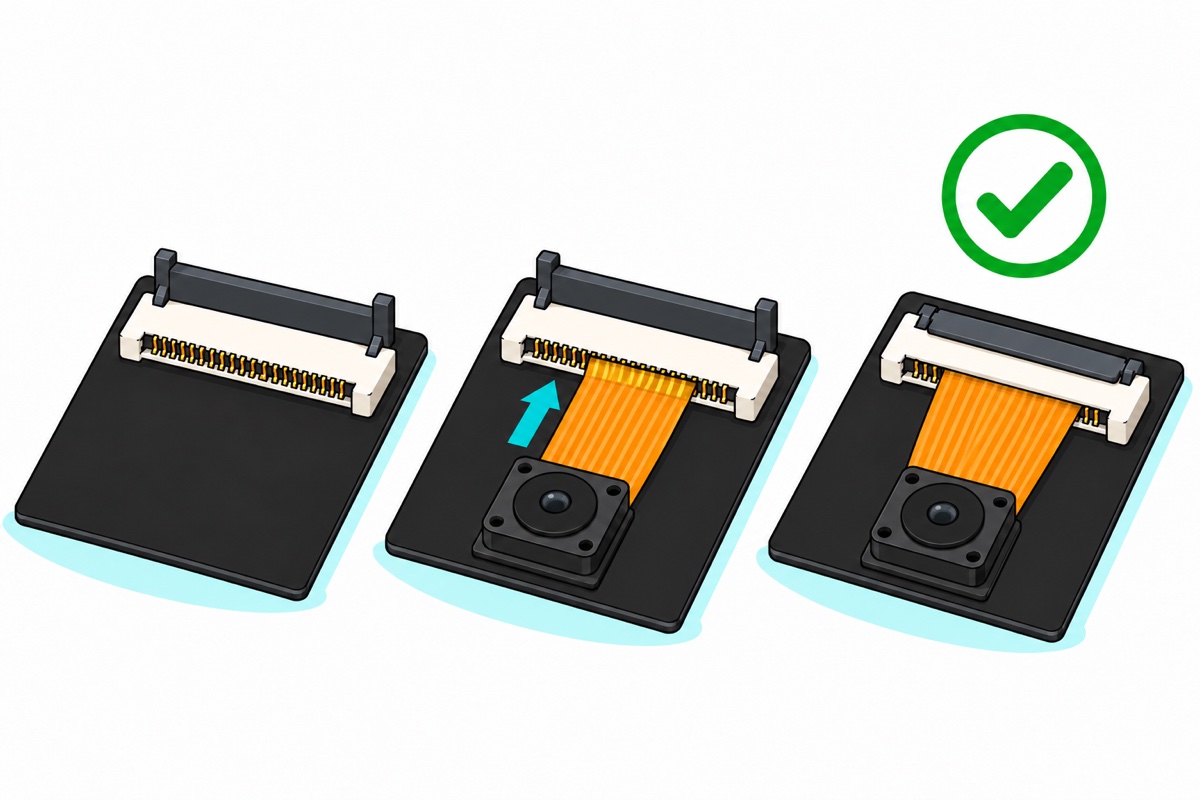
The S3 kit’s OV5640 comes loose, so you open the connector on day one; the classic board’s OV2640 comes fitted, but the same rules apply whenever you reseat it. The FPC connector’s hinged latch is what makes contact: closed, it presses the ribbon’s 24 gold fingers onto the socket’s spring contacts; open, the ribbon just rests in the slot. Half-closed, or with the ribbon short of fully in, some lines stay open, the driver cannot find the sensor, and the log reports “Camera init failed”.
- Unplug the USB cable first: a ribbon sliding across live contacts can bridge neighbouring pins, the power pins included.
- Lift the dark latch bar by its edge with a fingernail until it stands about upright. It is hinged, not removable; forcing it further snaps the hinge.
- Look into the slot: the metal contacts sit on one side. Slide the ribbon in straight, gold fingers facing them, until the fingers have all but disappeared into the slot.
- Press the latch flat while holding the ribbon square.
Fold the camera into place in a gentle curve, never a crease: copper traces crack at a sharp fold, and a cracked trace can look perfect while one signal has gone.
What voltage does an ESP32-CAM need?
Both ESP32 camera boards run from 5 V, through the USB socket or the 5V pin, and an on-board regulator makes the chip’s 3.3 V. The classic board also has a 3.3V pin, but it bypasses that regulator, so whatever feeds it must hold 3.3 V through every current spike on its own.
Camera start-up is what exposes a weak supply. The sensor powers up just as most sketches bring up Wi-Fi, whose transmit bursts draw a few hundred milliamps. A thin cable’s resistance turns each current burst into a voltage drop and a tired port sags on top of it; once the dip reaches the chip, the brownout detector resets the board, the reset restarts the camera, and it dips again: a reboot loop with “Brownout detector was triggered” in the log. Use a short data cable and a direct port or a decent 5 V adapter; powering ESP32 projects covers batteries and the full fix.
Which ESP32-CAM should you order?
First camera project, no USB-to-serial adapter on the bench, or a deadline: take the ESP32-S3 WROOM CAM. It also wins for on-board processing.
Already own an adapter, or want the lowest-cost route: the classic AI-Thinker board with the OV2640 is still fine. Ours comes on its programmer shield, so the adapter is optional.
Common mistakes we see
Ordering a bare ESP32-CAM and expecting a USB port. The cable has nowhere to go and the project waits for an adapter. Check the listing says programmer shield or MB, or order the S3.
Buying the OV7670 because it turns up in a “camera module” search. It is a different class of part: a pin header instead of a ribbon, and no JPEG.
Chasing code when the board resets at camera start. That is a power fault; fix the cable and supply first.
FAQ
Which ESP32-CAM board is best for beginners?
The ESP32-S3 WROOM CAM: one USB-C cable, no adapter or boot jumper, and 8 MB of PSRAM for larger frames and on-board processing.
Can I program an ESP32-CAM without a programmer?
Not the classic AI-Thinker board, which has no USB. Use the ESP32-CAM-MB shield (ours ships with it) or a USB-to-serial adapter plus a GPIO0-to-GND jumper. The S3 has native USB.
What is the difference between the OV2640 and OV5640?
1600 × 1200 (2 MP) against 2592 × 1944 (5 MP), both with hardware JPEG. On a phone they look the same until you zoom in.
What is the operating voltage of the ESP32-CAM?
5 V into the USB socket or 5V pin; the regulator makes 3.3 V.
Can I use an OV7670 with an ESP32-CAM?
No: it has header pins instead of the 24-pin ribbon, and no JPEG encoder.
Last updated October 2026. Stuck? Chat with us on WhatsApp.
